
For an online store to work successfully, the checkout process needs to be smooth, simple, and frustration-free. The checkout page is one of the most critical moments in a customer’s journey — any friction at this stage significantly increases the chance they’ll abandon their order entirely.
One small but effective improvement you can make is to automatically fade out error messages on the WooCommerce checkout page after a few seconds. Instead of a harsh red error banner sitting permanently on the screen, the message appears, gives the customer time to read it, and then gently disappears, keeping the page clean and the experience calm.
This single tweak can improve the perceived quality of your checkout and give customers the confidence to complete their purchase.
Why This Matters for Your Store
Error messages on the checkout page — like “Billing First Name is a required field” are necessary. But leaving them permanently on screen can feel overwhelming, especially for less tech-savvy shoppers. A message that fades out after a few seconds still does its job (the customer sees it and knows what to fix) without making the page feel broken or intimidating.
This is a small UX detail, but small details add up to big differences in conversion rates.
How to Add the Fade Out Code
Adding this function is straightforward. Go to your WordPress dashboard and navigate to:
Dashboard > Appearance > Theme Editor > Theme Functions (functions.php)
Scroll to the very end of the existing code and paste the following snippet, then click Update File:
add_action( ‘wp_footer’, ‘checkout_fadeout_error_message’ );
function checkout_fadeout_error_message() {
// Only on front-end checkout page
if ( is_checkout() && ! is_wc_endpoint_url() ) :
?>

<script>
jQuery(function($){
    $(document.body).on( 'checkout_error', function(){
        var wooError = $('.woocommerce-error');
        setTimeout(function(){
            wooError.fadeOut(160);
        }, 4000);
    });
});
</script>

<?php
endif;
}
How to Customize the Fade Out Timing
The number 4000 in the code controls how long the error message stays visible before it fades out. This value is in milliseconds — so 4000 equals 4 seconds.
Here’s a quick reference:
| Value | Duration |
|---|---|
2000 | 2 seconds |
3000 | 3 seconds |
4000 | 4 seconds (default) |
6000 | 6 seconds |
Simply replace 4000 with your preferred value. For most stores, 3–4 seconds is the sweet spot — long enough for the customer to read the message, short enough to keep the checkout feeling clean.
The 160 value in fadeOut(160) controls the speed of the fade animation itself (in milliseconds). You can leave this as-is or increase it for a slower, more gradual fade.
Before and After
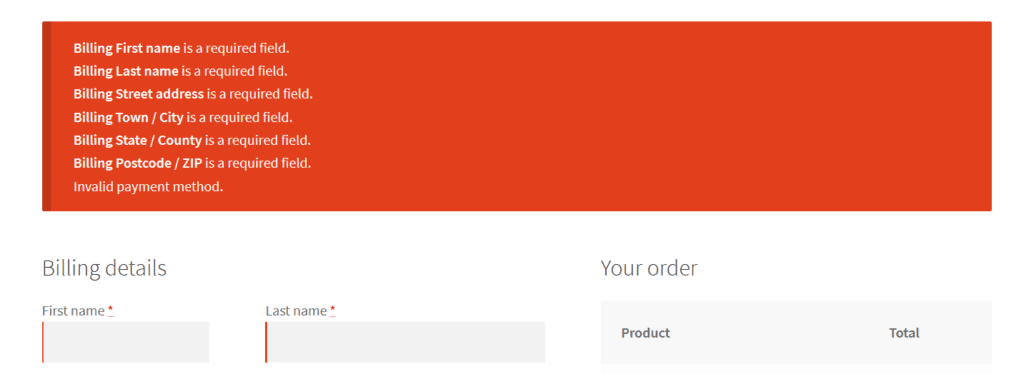
After
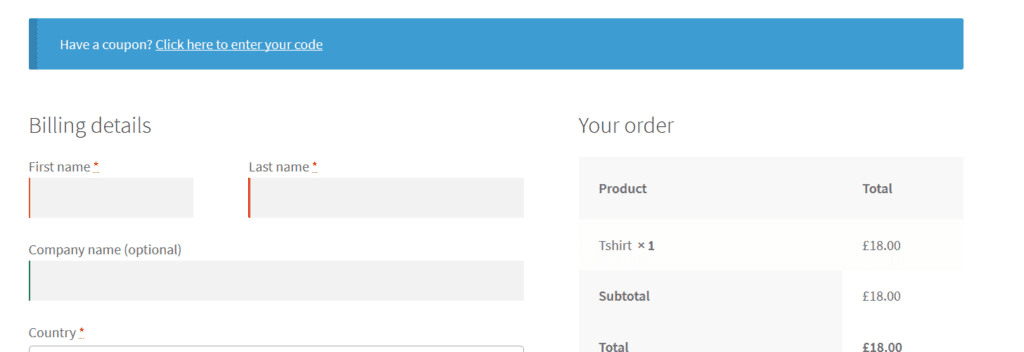
Wrapping Up
A checkout page that feels smooth and professional makes a real difference to your conversion rate. This simple snippet — just a few lines of jQuery wrapped in a PHP function, adds a polished touch that customers will notice, even if they don’t know why the experience feels better.
Small improvements like this are exactly the kind of thing that separates a store that converts well from one that doesn’t.
Frequently Asked Questions
Will this work with the new WooCommerce Block Checkout?
This snippet uses the checkout_error jQuery event from WooCommerce’s classic checkout. If your store is using the newer Block-based checkout (introduced in WooCommerce 8.x), this approach won’t trigger automatically. Block Checkout handles errors differently and would require a JavaScript-based approach targeting block events instead.
Does this hide the error permanently, will customers miss it?
No. The error message is fully visible for the duration you set (default 4 seconds) before fading. That’s enough time for a customer to read what went wrong. The fade-out only removes it visually, the validation still runs normally and the customer still cannot proceed until the issue is fixed.
Where exactly should I add this code in functions.php?
Paste it at the very bottom of your child theme’s functions.php file — after all existing code, before any closing ?> tag if one exists. If you’re not using a child theme, use the Code Snippets plugin instead to avoid losing changes during theme updates.
Can I make the error message fade out on pages other than checkout?
Yes, remove the if ( is_checkout() && ! is_wc_endpoint_url() ) condition from the code. Without it, the fade-out will apply to WooCommerce error messages across all pages (cart, account, etc.). Keep in mind this may not always be desirable — some error messages on other pages are better left visible.
What if the error message isn’t fading out after I add the code?
Check that jQuery is loaded on your checkout page (most themes include it by default). Also confirm you’ve added the code to the correct functions.php file — your child theme’s file, not the parent theme. If you’re using a caching plugin, clear the cache after saving.